一、Skill 是什么
定位:这篇只讲 Agent Skill 本体。Plugin、Hook、MCP、Subagent 只作为边界概念出现,详细内容放到对应专题笔记。
Agent Skill 是一个可复用的任务能力包,用来告诉 Agent:什么时候该使用某套流程、具体按什么步骤做、需要读取哪些参考资料、必要时运行哪些脚本。
它不是模型,不是插件,不是 MCP,也不是单纯 prompt。它更像“给 Agent 的工作流说明书 + 可选工具材料包”。
最小结构:
skill-name/
└── SKILL.md
常见完整结构:
skill-name/
├── SKILL.md
├── scripts/
├── references/
├── assets/
└── agents/
    └── openai.yaml
其中只有 SKILL.md 是 Agent Skills 标准里的必需文件。
scripts/、references/、assets/ 是标准推荐的可选资源目录;
agents/openai.yaml 是 Codex/OpenAI surface 的伴随配置,不是通用标准本体。
二、Skill 的渐进式披露机制
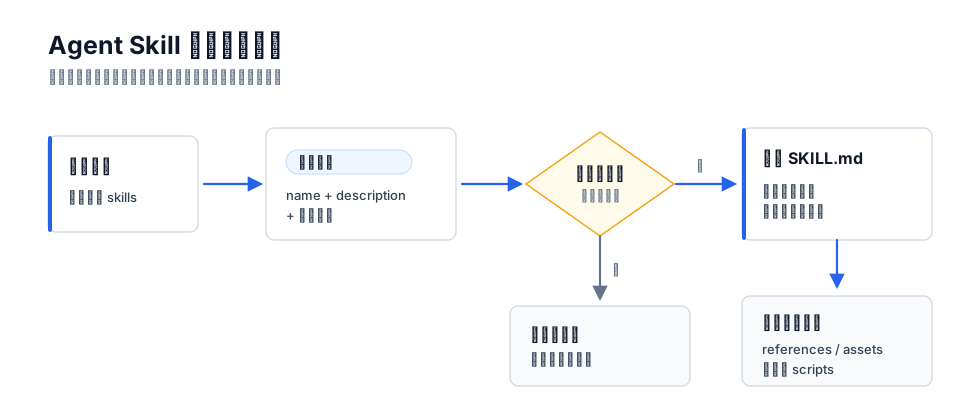 Agent 只看到每个 skill 的 `name` 和 `description`,不会一开始就把所有 `SKILL.md` 全部塞进上下文。
这也带来一个结论:description 是触发契约,不是普通摘要。 如果 description 写得含糊,skill 就不会在该用的时候被加载;如果写得太宽,就会到处误触发。
三、SKILL.md 的核心结构
SKILL.md 由 YAML frontmatter 和 Markdown 正文组成:
---
name: skill-name
description: Use when the user wants ...
---

## Workflow
...
标准 frontmatter 字段
Agent Skills 规范里的核心字段:
| 字段 | 必须 | 作用 |
|---|---|---|
name | 是 | skill 的稳定 ID,通常要求小写、数字、连字符,并和目录名一致 |
description | 是 | 触发说明:这个 skill 做什么、什么时候用、什么时候不用 |
license | 否 | 许可证或许可证文件说明 |
compatibility | 否 | 环境要求,例如目标 Host、系统依赖、网络要求 |
metadata | 否 | 扩展信息,如作者、版本、来源;是否被 Host 理解取决于实现 |
allowed-tools | 否 | 实验性工具授权字段,不同 Host 支持不一致 |
最重要的是 name 和 description。其他字段要当成附加信息,不要默认它们都有运行时效果。 |
description 怎么写
好的 description 回答三个问题:
- 用户说什么时应该用?
- 用户没明说关键词、但意图匹配时是否应该用?
- 哪些相似任务不该用?
写法上优先用:
description: Use when ...不要写成:
description: This skill helps with ...原因是 Agent 在做路由判断,Use when... 更像执行条件。
好例子:
description: Use when implementing a feature or bugfix that changes observable behavior and tests can be written before implementation.差例子:
description: Helps with testing.前者给了边界,后者什么都能沾边。
四、Skill 是怎么触发的
Skill 通常有两种触发方式:
| 触发方式 | 含义 | 适合什么 |
|---|---|---|
| 显式触发 | 用户直接输入 $skill、/skill-name 或从 UI 选择 | 高成本流程、有副作用动作、用户主动启动的工作流 |
| 隐式触发 | Agent 根据 description 判断任务匹配 | 常规能力、领域流程、工具使用规范 |
不同 Host 的显式入口不一样。Codex 常见 $skill,Claude Code 社区仓库里常见 /skill-name,这属于 Host 交互层,不是 SKILL.md 标准本身。
User-invoked 与 Model-invoked
mattpocock/skills 的划分很有参考价值:
| 类型 | 作用 | 例子 |
|---|---|---|
| User-invoked | 用户主动启动,通常是薄入口 | grill-me, grill-with-docs, to-prd |
| Model-invoked | 可复用底层能力,可被模型按语境调用 | grilling, domain-modeling, tdd |
grill-with-docs 的 SKILL.md 很短:
---
name: grill-with-docs
description: A relentless interview to sharpen a plan or design, which also creates docs (ADR's and glossary) as we go.
disable-model-invocation: true
---
Run a `/grilling` session, using the `/domain-modeling` skill.这说明一个重要设计:入口 skill 可以很薄,真正的方法论放到底层 skill。
disable-model-invocation
disable-model-invocation: true 是 Claude Code / 社区技能中常见的 Host 扩展字段,含义是禁止模型自动触发,只允许用户显式调用。
适合加这个字段的 skill:
- 部署、提交、发消息等有副作用动作。
- 需求澄清、长时间访谈等高交互成本流程。
- 用户必须主动选择的工作模式。
它不是 Agent Skills 官方标准字段,跨 Host 复用时要确认目标环境是否支持。
五、Codex 里的 agents/openai.yaml
Codex 对 skill 的核心仍然是 SKILL.md。但在 Codex App/OpenAI surface 中,skill 目录旁边经常会有:
agents/openai.yaml它不是执行说明,而是界面和调用策略 metadata。
典型结构:
interface:
  display_name: "Documents"
  short_description: "Create and edit Word and Google Docs files"
  icon_small: "./assets/file-document.png"
  icon_large: "./assets/file-document.png"
  brand_color: "#2563EB"
  default_prompt: "Use $documents to create, edit, redline, or review a Word file."
policy:
  allow_implicit_invocation: true
dependencies:
  tools:
    - type: "mcp"
      value: "openaiDeveloperDocs"
      description: "OpenAI Docs MCP server"
      transport: "streamable_http"
      url: "https://developers.openai.com/mcp"
字段含义:
| 字段 | 作用 |
|---|---|
interface.display_name | 展示给用户看的名称 |
interface.short_description | UI 上的短描述 |
interface.icon_small / icon_large | 图标或预览图 |
interface.brand_color | UI 品牌色 |
interface.default_prompt | 用户从界面选择时默认注入的提示 |
policy.allow_implicit_invocation | 是否允许 Codex 根据自然语言隐式调用;false 时显式 $skill 仍可用 |
dependencies.tools | 声明依赖的工具,例如 MCP server |
最容易混的是 description 和 default_prompt:
| 字段 | 面向谁 | 作用 |
|---|---|---|
SKILL.md 的 description | 模型路由 | 判断什么时候加载 skill |
openai.yaml 的 default_prompt | 用户入口 | 用户点这个入口时默认发什么请求 |
所以 agents/openai.yaml 不是 SKILL.md 的替代品。没有 SKILL.md,skill 没有执行流程;没有 agents/openai.yaml,skill 仍然可以工作,只是 Codex 界面上少了展示和策略配置。
Codex frontmatter 里常见但不要误判的字段
有些 Codex 或个人插件 skill 会在 SKILL.md frontmatter 里写:
version: 0.1.3
tags: [obsidian, notes, markdown]
user_invocable: true
这些更像本地维护字段或 Host 扩展字段。不要把它们等同于 Agent Skills 标准字段,也不要把 user_invocable 和 Claude Code 常见的 user-invocable 混为一谈。
六、scripts/、references/、assets/ 怎么分工
scripts/
scripts/ 放确定性工具。适合把 Agent 容易写错、每次都要重复做、或者需要严格验证的逻辑固化成脚本。
适合写脚本的场景:
- 解析文件、转换格式、生成报告
- 校验输出是否符合规范
- 管理本地服务生命周期
- 调用固定 CLI/API
- 批量处理数据
Anthropic webapp-testing 的经验很重要:脚本优先当黑盒运行,先看 --help,不要一上来读完整源码。 脚本源码可能很长,读进去会污染上下文。
references/
references/ 放长参考资料。适合 API 细节、错误码、业务口径、schema、排障手册。
不要只写:
See references/ for details.更好的写法是:
If the API returns a non-200 status, read `references/api-errors.md`.
If the user asks for billing metrics, read `references/billing-schema.md`.
核心是让 Agent 知道什么时候读取哪份资料。
assets/
assets/ 放模板、图片、预览图、示例文件、品牌资源。比如 artifact template skill 常见:
artifact-template-name/
├── SKILL.md
├── artifact-template.json
├── agents/openai.yaml
└── assets/
    ├── reference.docx
    └── preview.png
preview.png 可以给 Codex UI 展示,reference.docx 则是生成文档时的真实格式来源。
七、写一个好 Skill 的结构
一个工程可用的 SKILL.md 通常包含这些部分:
---
name: ...
description: Use when ...
---

## Goal
这个 skill 解决什么问题。

## When To Use
应该触发的场景。

## Do Not Use
容易误触发但不该使用的场景。

## Workflow
按步骤执行。

## Gotchas
Agent 没有这条说明就容易犯错的地方。

## Validation
怎么确认做完了。

## Output
最终回答或产物格式。
不需要每个 skill 都套完整模板。小 skill 可以很短;复杂 skill 才需要更多章节。关键是每一节都要服务执行,不要写成百科。
八、优秀 Skill 的写法范式
只写 Agent 不知道的
不要解释 PDF 是什么、HTTP 是什么、测试是什么。Skill 应该写 Agent 在这个任务里会缺失的东西:项目约定、工具选择、业务口径、失败恢复、验证命令。
给默认值,不给菜单
差写法:
You can use pypdf, pdfplumber, PyMuPDF, or pdf2image.好写法:
Use pdfplumber for text extraction. For scanned PDFs, use pdf2image with pytesseract.Agent 需要默认路径,不需要一堆平级选项。
用流程,而不是口号
差写法:
Write high quality code and test carefully.好写法:
1. Write a failing test.
2. Run it and confirm the failure is about the missing behavior.
3. Write the minimum implementation.
4. Re-run the test.
5. Refactor only after green.
Skill 的价值在于把抽象原则变成可执行步骤。
写 Gotchas
Gotchas 是很多 skill 里最有价值的部分,因为它记录的是“合理猜测会错”的事实。
例子:
## Gotchas
- The `users` table uses soft deletes. Always include `deleted_at IS NULL`.
- `/health` only checks the web server. Use `/ready` for database readiness.
写验证循环
复杂任务必须告诉 Agent 怎么证明自己做完:
1. Make the change.
2. Run `python scripts/validate.py output/`.
3. If validation fails, fix and rerun.
4. Stop only when validation passes.
没有 loop 的 skill 很容易变成“看起来完成了”,所以 loop 一定要闭环。
九、几个顶尖 skills
Anthropic 官方 skills
适合看标准结构和复杂生产技能。
pdf:长description覆盖完整触发场景,正文给工具选择和 quick reference。webapp-testing:用决策树选路径,强调脚本黑盒化和--help。
Superpowers
适合看强流程 skill。
test-driven-development用 “Iron Law” 固化不可违反规则。- 用 Graphviz/DOT 表达 TDD 状态机。
- 用
<Good>/<Bad>对比教 Agent 判断测试质量。 - 用 rationalization table 封堵“这次可以不测”的借口。
Vercel agent-skills
适合看环境感知 skill。
deploy-to-vercel先收集项目状态,再选择部署路径。- 同一 skill 里区分 Claude Code、claude.ai sandbox、Codex sandbox。
- 对认证失败、网络受限、权限升级写清处理路径。
Addy Osmani agent-skills
适合看工程生命周期 skill。
code-review-and-quality把 review 拆成 correctness、readability、architecture、security、performance。- 要求 severity label、verification story、red flags。
- 把 review 从“挑毛病”提升成质量门禁。
mattpocock/skills
适合看小 skill 组合。
grill-with-docs是薄入口。grilling是需求追问流程。domain-modeling负责沉淀CONTEXT.md和 ADR。- 入口 skill 调底层 skill,比一个超大 skill 更容易维护。
注意:
grill-with-docs、grilling、domain-modeling是mattpocock/skills仓库里的具体 skill 名称,不是 Agent Skills 标准自带命令。这里引用它们只是为了说明“薄入口 skill 调度底层 skill”的写法。
十、什么时候该写 Skill
适合写 skill:
- 同类任务反复出现
- Agent 没有明确流程时容易跑偏
- 有项目特有知识、业务口径、工具路径或验证标准
- 需要按需加载脚本、模板、参考资料
- 希望不同 Agent/不同会话稳定复用同一套做法
不适合写 skill:
- 一次性任务
- 只是一条简单偏好,写进
AGENTS.md更合适 - 只是一个真实系统能力,做 MCP/tool 更合适
- 只是生命周期自动检查,做 Hook 更合适
- 只是用户入口包装,做 command 更合适
对于无法复用的多轮次性任务来说,个人最佳实践是建立 project 独立线程,写一个 CLAUDE.md 或 AGENT.md,避免长会话中频繁输入 prompt
十一、写 Skill 前的闸门
写 skill 之前不要先列 TODO,而是先过四个闸门:值不值得做、能不能准确触发、正文是否只放执行材料、发布前是否跑过真实任务。
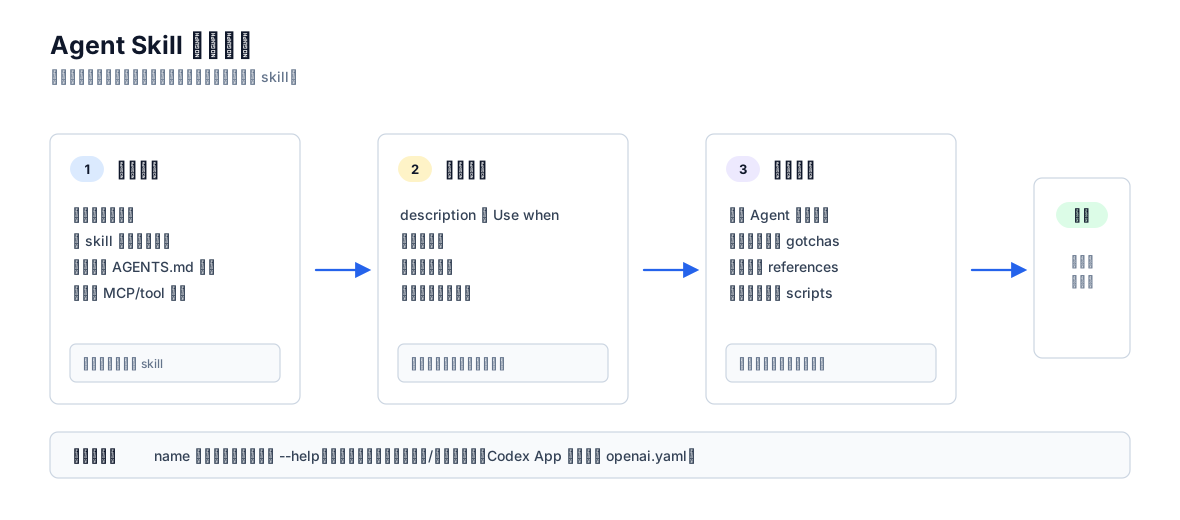
先判断是否值得做,再写触发契约,再组织执行材料,最后验证发布。如果第一步都过不了,就不该创建 skill。
十二、常见反模式
| 反模式 | 问题 | 正确做法 |
|---|---|---|
description 写成流程摘要 | Agent 可能按摘要走,不读正文 | 只写触发条件和边界 |
| 把 skill 写成百科 | 激活后污染上下文 | 只写执行需要的信息 |
| 给多个等价工具 | Agent 难决策 | 给默认工具和 fallback |
| 让 Agent 先读脚本源码 | 浪费上下文 | 先 --help,黑盒执行 |
| 只写原则不写步骤 | 不可执行 | 写 workflow 和 validation |
| 有副作用流程自动触发 | 可能误部署、误提交、误发消息 | 显式调用或关闭隐式调用 |
把 agents/openai.yaml 当执行说明 | 它只是 UI/策略 metadata | 执行流程放 SKILL.md |
| 把 Plugin/Hook/MCP 都塞进 Skill 文档 | 主题发散 | Skill 文档只讲 skill,本体外内容放边界表 |
十三、边界:哪些不是 Skill
| 概念 | 为什么不是 Skill | 放哪里看 |
|---|---|---|
| Plugin | 分发容器,可以包含多个 skills、apps、MCP、hooks | [[ai/Agent Plugin 完全指南 |
| Hook | 生命周期脚本,直接执行命令,不是模型工作流说明 | [[ai/Codex 与 Claude Code 的 Skill Plugin Hook 机制 |
| MCP | 外部工具协议,提供真实系统能力 | [[ai/Agent MCP 完全指南 |
| Subagent | 独立 Agent 线程,用于并行或角色隔离 | Codex Subagents 相关笔记 |
AGENTS.md | 仓库级长期规则,不是按需加载技能包 | Codex 配置/规则相关笔记 |
| Command | 用户入口层,可能调度 skill,但本身不是 skill 标准 | Plugin 或 Host command 文档 |
理解边界的目的不是排斥这些概念,而是避免把一篇 “Agent Skills” 笔记写成 “Codex 扩展系统大全”。
十四、速查:看到文件时怎么判断
| 文件 | 说明 |
|---|---|
SKILL.md | skill 的核心说明 |
scripts/* | skill 可调用的确定性脚本 |
references/* | 按需读取的长参考资料 |
assets/* | 模板、图片、预览、示例资源 |
agents/openai.yaml | Codex/OpenAI surface 的展示、默认 prompt、隐式调用策略、工具依赖 |
.codex-plugin/plugin.json | plugin manifest,不是 skill 本体 |
hooks.json | 生命周期 hook,不是 skill |
.codex/agents/*.toml | custom subagent,不是 skill |
十五、参考来源
- Agent Skills specification
- Agent Skills best practices
- Agent Skills optimizing descriptions
- OpenAI Codex Agent Skills
- anthropics/skills
- obra/superpowers
- vercel-labs/agent-skills
- addyosmani/agent-skills
- mattpocock/skills